The Copy Envelope feature in WESIGNDOC allows you to quickly duplicate an existing envelope and reuse it without starting from scratch. When you copy an envelope, all essential elements—documents, recipients, and signing fields—are carried over into a new draft, saving valuable setup time.
You can copy envelopes that are in progress, completed, making this an ideal feature for recurring agreements, repeated workflows, or sending the same document to new recipients.
Why Use Copy Envelope?
Copy Envelope is a powerful time-saving tool designed to reduce repetitive work. Instead of rebuilding the same envelope again and again, you can duplicate an existing one and make only the necessary changes before sending.
With a copied envelope, you are free to:
-
Update or replace documents
-
Change recipients or roles
-
Edit the email subject and message
-
Adjust signing fields as needed
This flexibility makes Copy Envelope perfect for businesses that rely on standardized documents.
Common Use Cases
Some common scenarios where Copy Envelope is especially useful include:
-
Reusing a completed envelope to send the same agreement to a new client
-
Sending identical contracts to multiple customers at different times
-
Reissuing documents with minor changes instead of rebuilding them
-
Speeding up workflows that rely on repeated document formats
What Gets Copied in an Envelope?
When you copy an envelope in WESIGNDOC, the following information is included:
-
Documents: All files attached to the original envelope
-
Recipients: Recipient names, email addresses, and authentication details
-
Envelope Details: Email subject, email message, and custom envelope fields
-
Field Data: All the fields that were present in previous document
This ensures you retain structure and data while avoiding unnecessary rework.
How to Copy an Envelope in WESIGNDOC
-
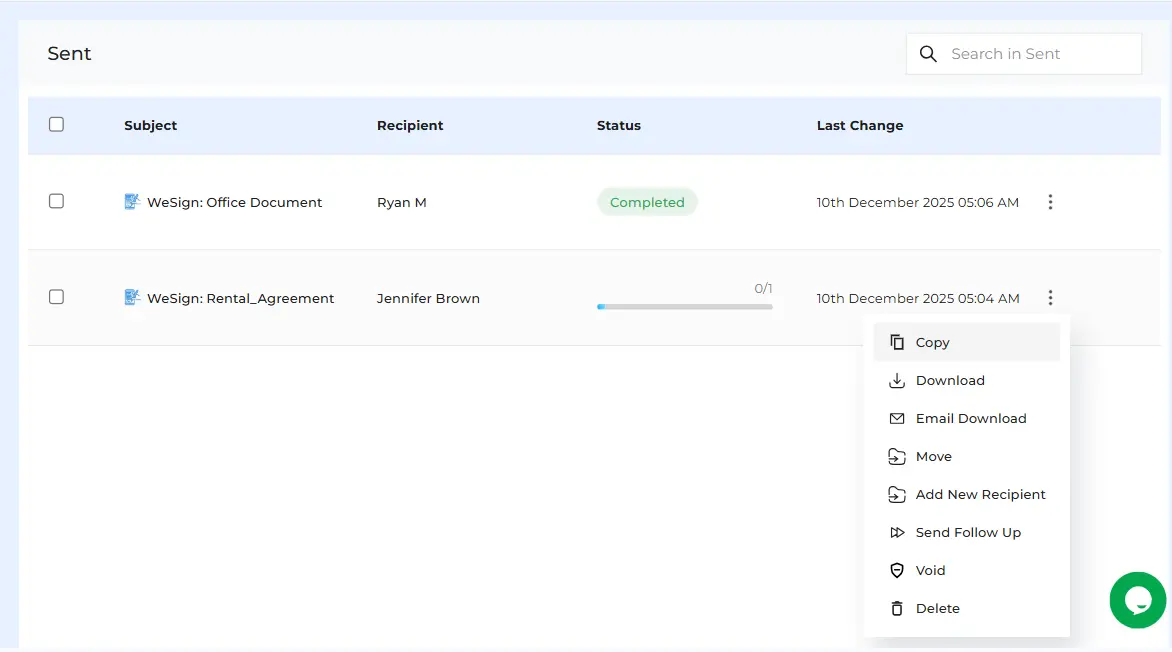
From the Manage Documents page, locate the envelope in the Sent section.
You can find it by searching, filtering, or browsing the list.
-
Click the Actions (three-dot) icon next to the envelope and choose Copy.
-
Make changes you need for the envelope, such as adding or removing documents, updating recipients, or modifying the email message.
-
Click Next to access the document canvas and adjust recipient fields or placement.
-
Once everything is updated, click Send to deliver the new envelope.
How Copy Envelope Improves Your Workflow
The Copy Envelope feature helps teams work faster and smarter by:
-
Eliminating repetitive setup tasks
-
Maintaining consistency across documents
-
Reducing errors from manual recreation
-
Improving turnaround time for agreements
-
Supporting scalable document workflows
This feature is especially useful for sales teams, HR departments, legal teams, finance, real estate, and customer onboarding processes.

 Products
 eSignature Send, sign, and track documents
 Mobile App Sign, send, and manage documents from anywhere
 Smart Document Templates Build, reuse, and standardize documents
 Mass Document Sending (Bulk Send) Send forms to thousands in one go
 Web Forms Share links to collect signed forms
 Secure SMS Delivery Send sign links directly via SMS
 Robust API Integration Automate sending and tracking flows
 Developer SDK Toolkits Add eSign features to any product