WESIGNDOC Field Types

By WesignDoc • Updated Jan 2026

Field Types in WESIGNDOC help you collect signatures, confirmations, and essential information directly from recipients on your documents. These fields are placed on the document canvas and clearly guide signers on what actions are required before completing the document.

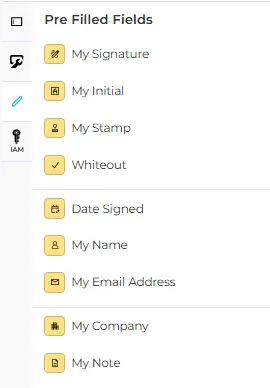
WESIGNDOC provides two categories of fields: Standard Fields for recipients and Pre-Filled Fields for the sender or account owner.

Standard Fields (For Recipients)

  • Signature:- Allows recipients to sign by drawing, typing to select a signature style, or uploading an image.
  • Initial:- Lets recipients apply their initials after adopting a signature.
  • Stamp:- Enables recipients to add a stamp by creating one or uploading an image.
  • Date Signed:- Automatically fills in the signing date based on account date format settings.
  • Name:- Automatically displays the signer’s name from recipient details.
  • Email Address:- Automatically displays the signer’s email address.
  • strong>Company:- Allows the signer to enter their company name, if applicable.
  • Title:- Allows the signer to enter their job title or role within the company.
  • Text:- Allows recipients to type custom information directly into the document.
  • Note:- Displays sender-provided instructions or information for the recipient to read.
  • Checkbox:- Allows recipients to select one or more options using checkboxes.
  • Dropdown:- Provides a list of predefined options where the recipient can select only one value.
  • Radio Button:- Allows recipients to select one option from a group of choices.
  • Drawing:- A free-draw field where recipients can write or draw content manually.
  • Attachment:- Allows recipients to upload supporting files as instructed by the sender.
  • field_1-envelope-img

Pre-Filled Fields (For Sender / Account Owner)

  • My Signature:- Inserts the sender’s saved signature directly onto the document.
  • My Initial:- Inserts the sender’s saved initials instantly.
  • My Stamp:- Inserts the sender’s saved personal or company stamp.
  • Whiteout:- Allows the sender to hide or remove unwanted content from the document.
  • Date Signed:- Automatically inserts the current date when placed.
  • Name:- Displays the sender’s saved name from profile settings.
  • Email Address:- Displays the sender’s saved email address.
  • Company:- Displays the sender’s saved company name, if applicable.
  • Title:- Displays the sender’s saved job title or designation.
  • field_2-envelope-img
Testimonials

What our clients say

Start Your Trial Now

Start WESIGN-DOC-logo-1WESIGN DOC today. Take a look and see which plan is right for you!